Plugins and Marketplaces
Extend k8s-autopilot with plugins that add new skills, sub-agents, MCP servers, and commands
Plugins let you add new capabilities to k8s-autopilot without modifying the core agent. Think of them as add-ons — each plugin brings a focused set of skills, tools, or even a dedicated sub-agent that the main agent can delegate tasks to when needed.
There are two types of plugins, and k8s-autopilot detects the type automatically based on directory contents:
| Type | What It Adds | How It Works |
|---|---|---|
| Agent plugin | A dedicated sub-agent with its own skills, MCP servers, and tool scope | The sub-agent runs in isolation — its tools don't mix with the main agent's tools |
| Vertical plugin | Skills and commands that extend the main agent directly | Skills bind directly to the main agent, giving it new capabilities |
If the plugin has an agents/ directory, it's treated as an agent plugin. Otherwise, its skills and commands bind directly to the main agent.
Only install plugins from sources you trust. An enabled plugin can add instructions, start MCP server processes, and register tools with your user permissions.
Install a Plugin from the UI
The easiest way to add plugins is through the Settings UI:
Step 1 — Open the Plugins Panel
Go to Settings → Plugins to see the Plugins & Extensions page. This is where you discover, install, and manage all your plugins:
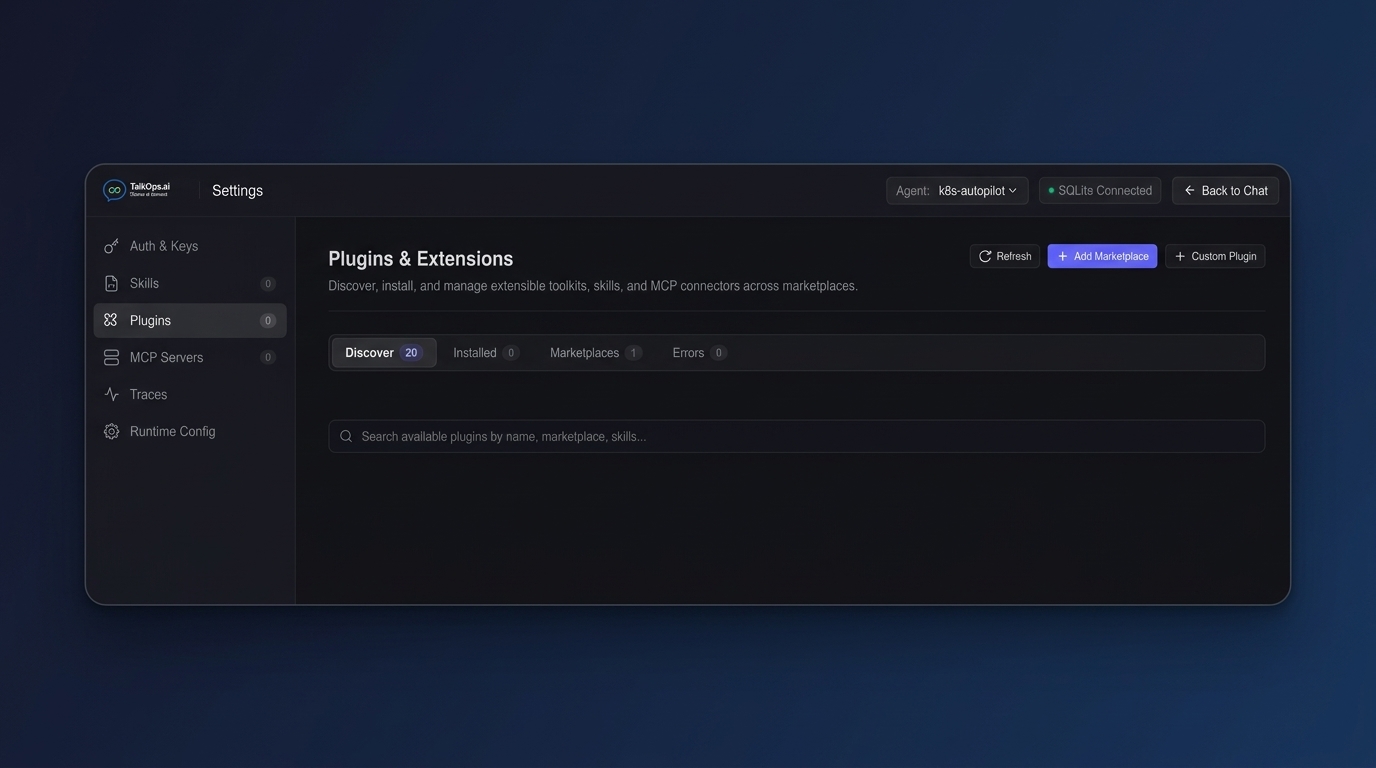
The panel has four tabs:
| Tab | What It Shows |
|---|---|
| Discover | Available plugins from all connected marketplaces |
| Installed | Plugins you've already installed (with enable/disable/uninstall controls) |
| Marketplaces | Your connected marketplace sources |
| Errors | Any plugins that failed to load, with detailed error logs |
Step 2 — Add a Marketplace
Before you can discover plugins, connect at least one marketplace. Click the + Add Marketplace button and enter a marketplace source:
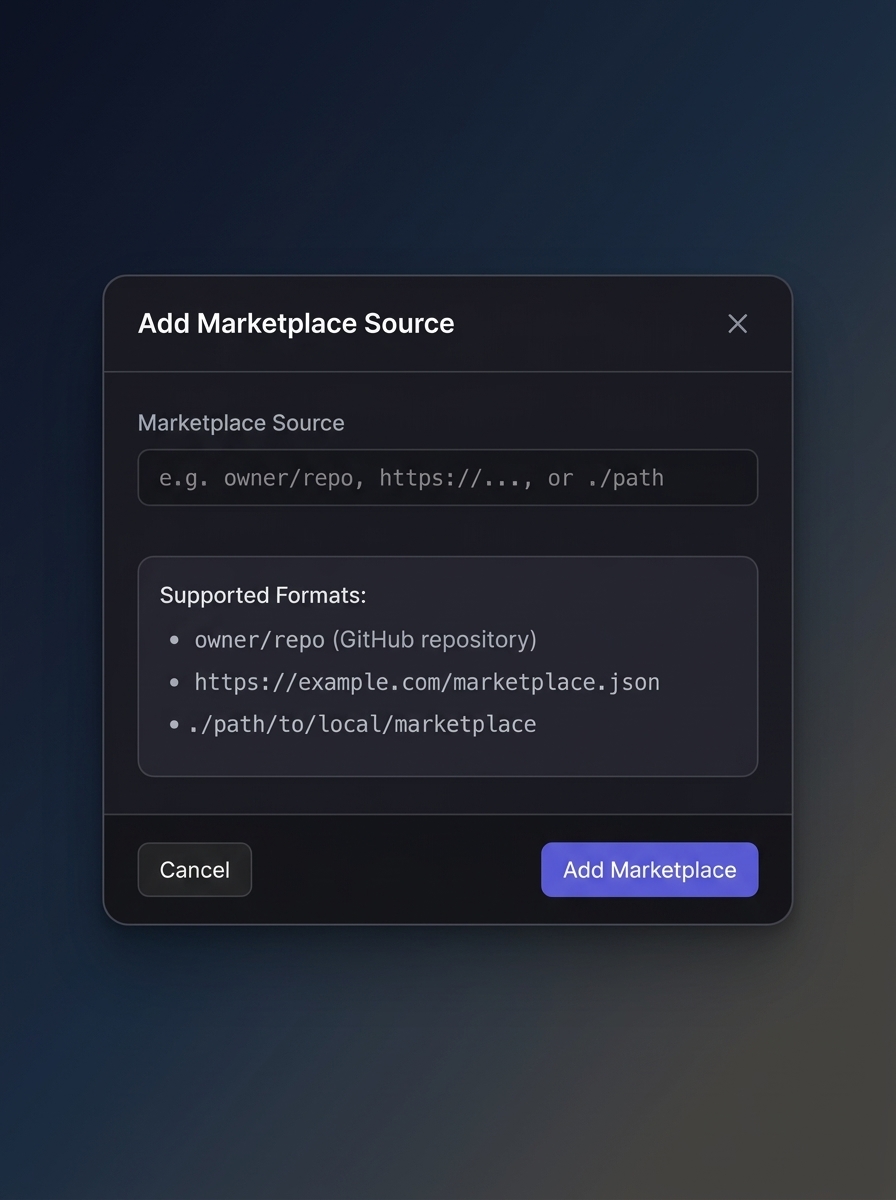
Supported marketplace formats:
- GitHub repository —
owner/repoformat (e.g.,anthropic/claude-for-financial-servicesortalkops-ai/community-plugins) - HTTPS URL — A URL pointing to a
marketplace.jsoncatalog file - Local path — A local directory containing a marketplace catalog
Click Add Marketplace to save. k8s-autopilot clones or downloads the marketplace catalog and indexes all available plugins.
Step 3 — Discover and Install Plugins
Once a marketplace is connected, switch to the Discover tab. You'll see all available plugins with their descriptions, skill counts, and version info:
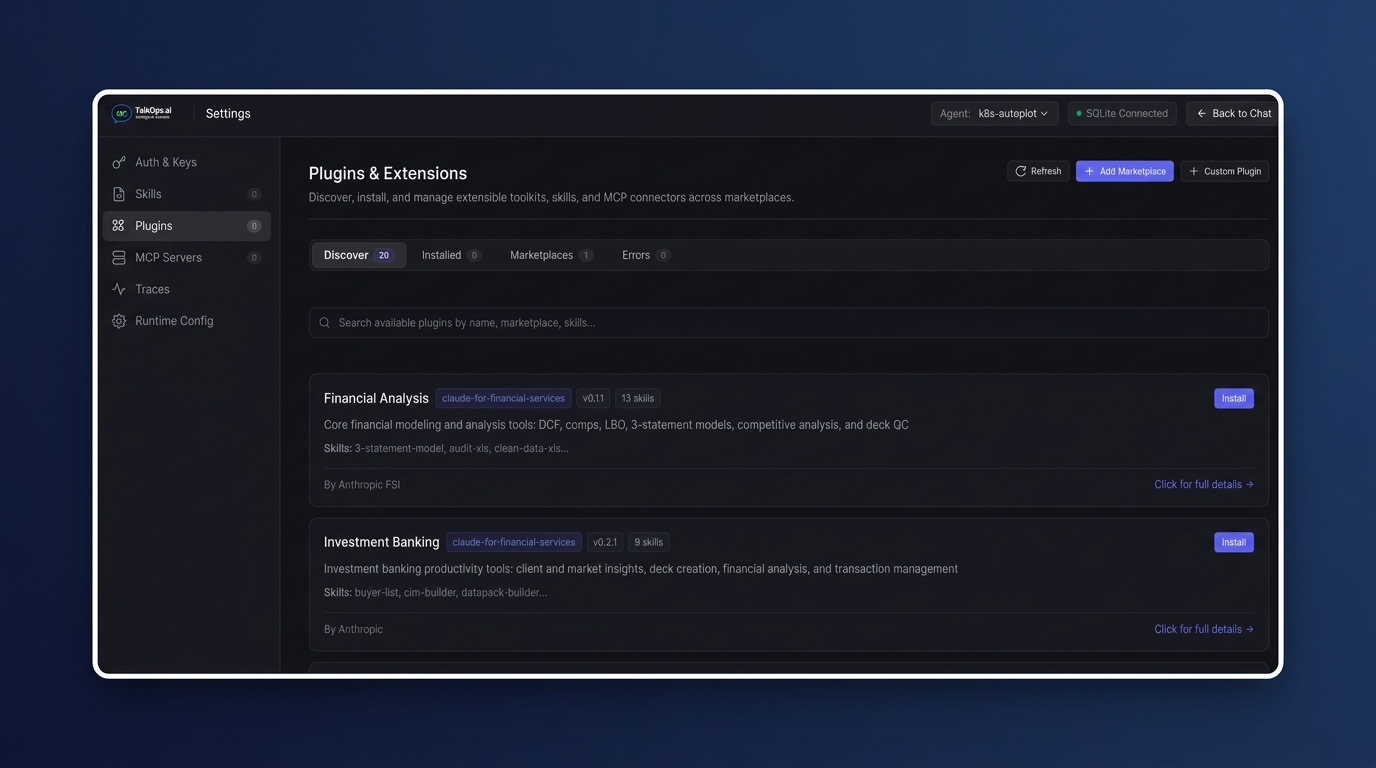
Each plugin card shows:
- Plugin name and marketplace source
- Version and number of skills included
- Description of what the plugin does
- Skills list — the individual capabilities the plugin brings
- Author — who built the plugin
Click Install on any plugin you want. Once installed, the plugin's skills and tools are immediately available to the agent — no restart needed. If it's an agent plugin, a new sub-agent is registered and the main agent can delegate tasks to it. If it's a vertical plugin, its skills are added directly to the main agent's context.
You can also click + Custom Plugin to add a plugin from a local directory or Git repository that isn't part of any marketplace.
Managing Installed Plugins
From the Installed tab, you can:
- Enable/disable a plugin — Disabled plugins stay installed, but their skills and tools are excluded from the agent.
- Uninstall a plugin — Removes it completely from the filesystem and database.
- View details — Inspect all skills, MCP servers, and commands the plugin provides.
Plugin Types Explained
Agent Plugins
An agent plugin creates a dedicated sub-agent that runs independently from the main agent. The sub-agent has its own skills, its own MCP servers, and its own tool scope. The main agent can delegate tasks to it, but the sub-agent cannot access the main agent's tools, and vice versa.
This is useful when you want a plugin to operate as a domain specialist — for example, a Terraform linting agent that only has access to file reading tools and Terraform-specific skills.
Example structure:
terraform-linter/
├── plugin.json                 # Plugin metadata
├── agents/                     # Makes it an agent plugin
│   └── terraform-linter/
│       └── AGENTS.md           # Sub-agent system prompt
└── skills/
    ├── tf-fmt-check/
    │   └── SKILL.md
    └── tf-validate/
        └── SKILL.md
When installed, the sub-agent is registered with the main agent. When you ask something like "lint my Terraform module", the main agent recognizes the request and delegates it to the Terraform linter sub-agent.
Vertical Plugins
A vertical plugin adds skills and commands directly to the main agent — no sub-agent involved. Use vertical plugins for cross-cutting capabilities that should be available everywhere, like security scanning, cost estimation, or compliance checks.
Example structure:
security-scanner/
├── plugin.json                 # Plugin metadata
├── skills/
│   ├── vuln-scan/
│   │   └── SKILL.md
│   └── compliance-check/
│       └── SKILL.md
└── .mcp.json                   # Optional bundled MCP server
When installed, the skills (vuln-scan, compliance-check) become part of the main agent's skillset. The agent can use them in any conversation.
Plugin Structure
A plugin is a directory with a manifest file and optional subdirectories:
my-plugin/
├── plugin.json              # Required — metadata and version
├── skills/                  # Optional — domain skills
│   └── my-skill/
│       └── SKILL.md
├── agents/                  # Optional — sub-agent definitions (makes it an agent plugin)
│   └── my-agent/
│       └── AGENTS.md
├── .mcp.json                # Optional — bundled MCP server configuration
├── commands/                # Optional — custom slash commands
│   └── my-command.md
└── resources/               # Optional — templates, scripts, and assets
plugin.json
Every plugin needs a plugin.json manifest:
{
  "name": "my-plugin",
  "version": "1.0.0",
  "description": "What this plugin does — shown in the UI",
  "author": {
    "name": "Your Name"
  }
}
k8s-autopilot also natively recognizes manifests in .claude-plugin/plugin.json (Anthropic Claude) or .opscode-plugin/plugin.json (OpsCode) for seamless cross-platform reuse.
Bundled MCP Servers
Plugins can include a .mcp.json file to bundle their own MCP servers. These servers are started automatically when the plugin is enabled:
{
  "mcpServers": {
    "my-cost-api": {
      "command": "${PLUGIN_ROOT}/scripts/start-server",
      "env": {
        "API_KEY": "${MY_API_KEY}"
      }
    }
  }
}
Plugin MCP configs support automatic variable substitution at runtime:
| Variable | What It Resolves To |
|---|---|
${PLUGIN_ROOT} | The plugin's installation directory |
${PLUGIN_DATA} | The plugin's persistent data directory |
${PROJECT_DIR} | The current project directory |
${ENV_VAR} | Any system environment variable |
Marketplaces
A marketplace is a curated collection of plugins. It can be a GitHub repository, an HTTPS URL, or a local directory containing a marketplace.json catalog.
marketplace.json Format
{
  "name": "company-devops-plugins",
  "description": "Internal DevOps plugins for our team",
  "plugins": [
    {
      "name": "kubernetes-sre",
      "displayName": "Kubernetes SRE",
      "description": "SRE incident diagnostics and runbooks",
      "source": "./plugins/kubernetes-sre"
    },
    {
      "name": "cost-analyzer",
      "displayName": "Cost Analyzer",
      "description": "Cloud cost analysis and optimization recommendations",
      "source": "./plugins/cost-analyzer"
    }
  ]
}
Create Your Own Marketplace
To share plugins with your team:
- Create a Git repository with a
marketplace.jsonat the root. - Place each plugin in its own subdirectory.
- Reference plugin directories using relative paths in the
sourcefield. - Share the repository URL with your team.
Your team members can then add it from the Settings UI by clicking + Add Marketplace and entering your repository URL (e.g. my-org/devops-plugins).
Local Marketplace
You can also bundle a marketplace inside your project so plugins travel with your codebase:
.k8s-autopilot/plugins/marketplace.json
This makes the entire plugin ecosystem Git-trackable and team-shareable. Plugins in a local marketplace are automatically discovered on startup.
Where Plugins Are Stored
| Location | What's Stored There |
|---|---|
~/.k8s-autopilot/plugins/ | User-installed plugins from marketplaces |
~/.k8s-autopilot/plugins/marketplaces/ | Cloned marketplace repository catalogs |
.k8s-autopilot/plugins/ (project root) | Project-level plugins shared with the team via Git |
| Database (Settings UI) | Plugin enablement state and marketplace registry records |
Next Steps
- MCP Servers — How plugins bundle and configure their own MCP servers.
- Operators & Sub-agents — How plugin sub-agents integrate with the agent hierarchy.
- Skills & Memory — How skills guide agent behavior.
- Configuration — Runtime settings and environment variables.